The Real Technology Horror Stories Haunting Restoration Companies
Learn how restorers can uncover hidden risks in their systems, automation, data, cybersecurity, and AI
October is the season for haunted houses, scary movies and things that go bump in the night. But if you work in restoration, some of the scariest things aren’t hiding in a haunted house. They may be hiding inside your technology stack.
The scary part? Everything can appear to work just fine.
It might be the spreadsheet that somehow became mission-critical, but no one really owns it. The dashboard everyone trusts even though no one has validated the data behind it lately. The automation built two years ago under a team member’s account that everyone is afraid to turn off because no one remembers exactly what it does. Or the email that looks exactly like a legitimate security or account notification until someone enters their credentials and realizes a little too late that it wasn’t.
None of those examples are particularly exciting. They aren't the flashy side of technology that we tend to talk about at conferences or see demonstrated by software companies. But as restoration companies become increasingly dependent on technology, data, integrations, automation and now artificial intelligence, these are exactly the things we need to pay attention to.
The good news is that you don't have to be a technology expert to start asking better questions about your technology environment. You simply need a flashlight.
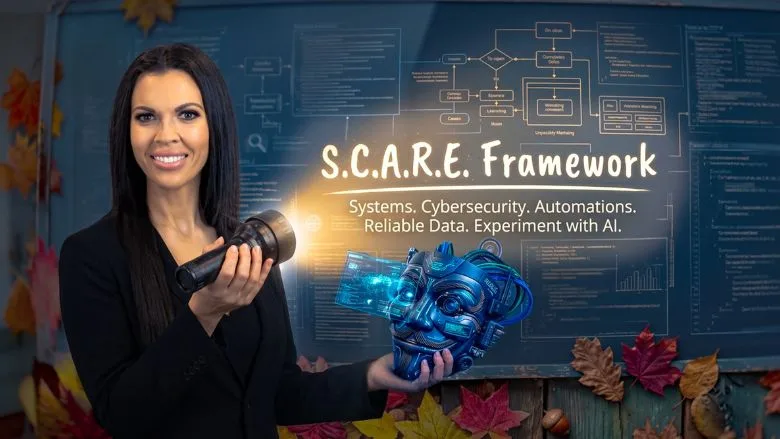
So, in honor of October, here is one way restoration leaders can shine a light into the darker corners of their technology stack. I call it the S.C.A.R.E. Framework: Systems, Cybersecurity, Automations, Reliable Data and Experiment with AI.
S: Systems: Know What You Depend On
Start with a simple question: What technology would significantly disrupt our business if it stopped working tomorrow?
Looking for quick answers on restoration, remediation and cleaning topics?
Try Ask R&R, our new smart AI search tool.
Ask R&R →
Most restoration companies have accumulated technology over time. We have job management systems, estimating platforms, documentation tools, CRM systems, accounting software, communication platforms, scheduling tools, and countless applications solving specific operational problems.
The challenge isn't necessarily having too much technology. The challenge is not knowing how all of it fits together.
Technology has a way of becoming interconnected before we realize it. One system feeds another, reports rely on data from multiple places, and automations quietly run in the background. Over time, the person who originally set something up may change roles or leave, while the process they built keeps running.
In restoration, this question can become very real, very quickly. If a major loss came in at 3:00 a.m. tonight, what technology would your team depend on to receive the loss, communicate, dispatch, document, estimate, and ultimately get paid? Those are the systems you need to understand first.
Before adding another piece of technology, map what you already have.
You don't need a complicated architecture diagram. Sit down with your team and create a basic technology inventory. What systems do we use? What business function does each support? Who owns it? Who administers it? What other systems depend on it? What happens if it goes down?
You may be surprised by how much you learn simply by putting everything on one page.
C: Cybersecurity: Assume Someone Will Eventually Click
We spend a lot of time teaching people not to click suspicious links. We should. But I think there is another conversation that matters just as much: What should someone do after they click?
Today's phishing attempts don't always look suspicious. They can look like a legitimate security notification, a document request, a vendor, a customer, or even someone inside your own organization. AI is only making those messages easier to personalize and harder to identify.
Restorers are particularly vulnerable because speed is built into our culture. A customer has a loss. A carrier needs documentation. A project manager is standing on a job site. An invoice needs approval. Everyone is moving quickly, and attackers know urgency makes people less likely to stop and inspect something closely.
Think about what moves through a restoration company every day: customer information, insurance information, estimates, photos, invoices, payments, and access to multiple third-party platforms. Cybersecurity isn't just a technology issue sitting somewhere in the background. It follows our teams from the office to the truck, to the job site.
So, train both sides of the event.
We have to stop treating the click as the end of cybersecurity training. What happens in the next five minutes matters just as much.
Teach team members how to identify suspicious messages, unexpected login requests and unusual multi-factor authentication (MFA) prompts. But equally important, give them a simple response plan.
At Southeast Restoration, we keep it simple: when a team member receives something suspicious, they forward it to the Technology Team and flag it as potential spam or phishing. We would much rather review something that turns out to be harmless than have a team member hesitate to report something that isn’t.
And if they already clicked, entered credentials or approved an MFA request, the expectation is equally simple: tell us immediately and tell us exactly what happened. The sooner the technology team knows, the sooner they can respond and contain the potential threat.
You want team members communicating quickly, not spending 30 minutes trying to determine whether something is serious enough to report.
Cybersecurity isn't just teaching people what not to do. It's making sure they know exactly what to do when something doesn't look right.
A: Automations: Find the Robots Working in the Dark
Automation is becoming one of the biggest opportunities in restoration technology. We can automatically create tasks, send customer communication, move information between systems, generate documentation, trigger reminders, and eliminate countless repetitive administrative steps.
But automation can also quietly become technical debt.
Ask your team to make a list of the automations currently running across your organization. Then ask four questions: What does it do? Who owns it? What identity or account does it run under? What happens when it fails?
That third question is especially important.
If an automation runs under an individual team member’s account, what happens when that person changes roles or leaves the company? If it stops working, does anyone receive an alert? If someone changes a field or workflow upstream, will anyone know what it breaks downstream?
Here's a simple test: If the person who built an automation was unexpectedly out tomorrow, could someone else understand what it does, know whether it failed and safely make a change to it?
If not, you don't just have an automation. You have a dependency.
Automations should make your business less dependent on people remembering repetitive steps. They shouldn't make your business dependent on the one person who remembers how the automation works.
R: Reliable Data: Don't Let Zombie (Dead) Data Make Decisions
Some of the most dangerous data isn't obviously broken.
It refreshes every morning. It appears on a polished dashboard. Leadership reviews it in meetings. Everyone assumes it is accurate.
But perhaps a source stopped updating. A field changed. A relationship was updated in one system but an export continues returning the original value. Two departments use the same word but define it differently.
The dashboard is alive. The data underneath it isn't.
That is why monitoring matters. If a critical dataset, integration or report stops refreshing, your technology team shouldn't have to wait for someone else to notice that yesterday's numbers are still showing. Build a process that automatically alerts the right people when data fails to refresh or falls outside its expected schedule.
The goal isn't just to have reliable data. It's to know quickly when your data is no longer reliable.
And in restoration, bad data doesn't stay on a dashboard. It can influence staffing, production decisions, incentive compensation, cash flow conversations, sales accountability, and where leadership focuses its attention. A wrong number can create a very real operational decision.
As restoration companies invest more heavily in business intelligence, this becomes increasingly important. And AI raises the stakes even higher.
We are quickly moving toward a world where leaders won't always open a report and interpret the numbers themselves. They will ask an AI assistant questions about the business and expect an answer.
- Which jobs need my attention?
- Where are we losing margin?
- Which projects are at risk?
- What should my team focus on today?
Those capabilities are exciting, but they depend entirely on the information underneath them.
AI doesn't clean up bad data simply because we put AI on top of it. If anything, it gives bad data a louder voice.
Pick five metrics your leadership team relies on most and trace them back to the source. Where does the number originate? How is it calculated? Who owns the definition? When was it last validated?
Then ask one more question: If this data stopped updating tomorrow, who would know?
If you cannot answer those questions, start there.
E: Experiment with AI — But Give It a Job
Finally, experiment.
There has never been a better time for restoration companies to explore what technology can do. AI can help summarize job information, search SOPs, draft communication, analyze data, identify exceptions, and increasingly interact with other systems.
But experimentation works best when it begins with a business problem rather than an AI tool.
Instead of starting with “How can we use AI?”, start with the business.
What problem are we trying to solve? Where are we experiencing friction? Could AI help us solve it?
Then experiment from there.
Don't start by buying another tool. Start by defining the problem.
Choose one use case. Give it an owner. Define what success looks like. Test it with a small group. Measure whether it actually saves time, improves an outcome, or creates a better experience. Then decide whether it deserves to scale.
If you can't explain what success looks like before the experiment starts, you'll have a hard time determining whether AI actually made anything better.
Not every experiment needs to become an enterprise initiative. Sometimes proving what doesn't work is just as valuable as proving what does.
Shine a Flashlight on Your Own Technology
The S.C.A.R.E. Framework isn't intended to become another giant technology project. In fact, I would encourage restorers to keep this incredibly simple.
Consider this your October S.C.A.R.E. Challenge: Set aside 60 minutes with your leadership and technology teams. No presentations. No complicated technology roadmap. Just a whiteboard and five conversations: Systems. Cybersecurity. Automations. Reliable Data. Experiment with AI.
Under each heading, answer one question:
- Systems: What technology can our business not operate without?
- Cybersecurity: Does every team member know exactly what to do if they click something suspicious?
- Automations: What is running in the background, and who owns it?
- Reliable Data: What numbers are we making decisions from, and do we trust them?
- Experiment with AI: What is one real business problem worth experimenting with?
You don't need to solve everything in the meeting. That's not the point.
The goal is to shine a flashlight into areas of your technology environment that may not get much attention until something goes wrong.
Before you leave the room, assign one action, one owner, and one due date under each category.
That's it.
In one hour, you will have identified five tangible ways to make your technology environment stronger before something hiding in the dark becomes a real problem.
Technology in restoration is moving incredibly fast. APIs, automation, business intelligence, cybersecurity, AI agents, and connected data environments are quickly becoming part of how our companies operate. That can feel intimidating, particularly when technology isn't your primary area of expertise.
But you don't need to understand every piece of technology to lead it well.
You need to know what your business depends on, protect it, understand what is happening behind the scenes, trust the information you're using to make decisions and remain willing to experiment with what comes next.
Because the scariest technology problem isn't usually the one making noise.
It's the one hiding quietly in the dark while everyone assumes everything is fine.
So, this October, grab a flashlight, gather your team, and shine a light on the places your organization may be vulnerable. Find the gaps, talk through the “what ifs,” and make sure everyone knows what to do when something suspicious comes knocking.
Looking for a reprint of this article?
From high-res PDFs to custom plaques, order your copy today!